
Collection continuity
Store records locally during communication failures.
Direction product
TCP/IP and serial data collector, Serial/IP gateway and SMS server
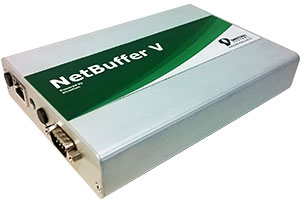
NetBuffer V is the Direction collector that can be used to store data from legacy equipment via RS232 serial (including PABX) or via TCP / IP.
Currently, NetBuffer V is the only product on the market with Push technology that allows the sending of collected information to an FTP server and remote programming via SMS. In addition, it can be used as a powerful SMS server and gateway for remote control via TELNET. Using M2M technology it can be fully managed remotely making it a completely “Plug and Play” device. It also has a storage capacity well above the previous models.
It is possible to use it as a command gateway so that it is possible to use the Credit Module for SaaS customers. In this functionality NetBuffer receives commands from TollManager or CallManager via FTP and resends them to the PABX.
You will be able to use a 3G USB Modem to connect to the internet and send data to Direction servers without the need for interference and firewall releases on the customer's network.
Using the USB 3G Modem you can make NetBuffer fully managed via SMS and even if you want to use it as a powerful SMS server.
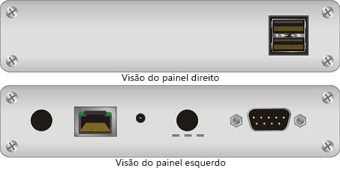
With two USB ports and a serial and built-in TCP / IP network functions, you can easily have your functions expanded for other uses.
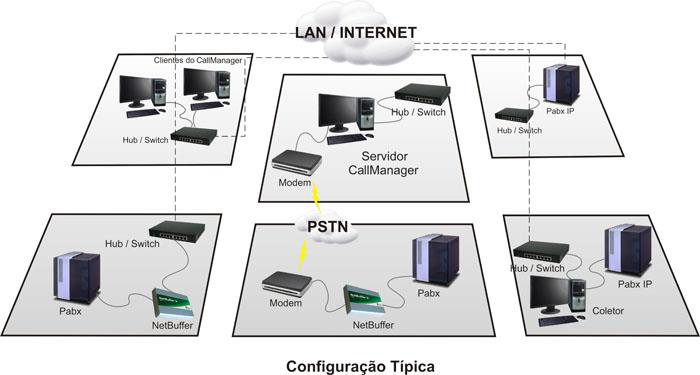
Serial PABX data collection remotely via LAN or WAN using TCP / IP;
Collection of IP data from PABX using TCP/IP sockets;
Command gateway for sending commands directly to the Pabx.
Capacity: 1.5GB (standard) and can be expanded to 32GB or more (see);
Communication: Uses standard TCP/IP protocols without the need for proprietary protocols;
Remote Configuration and Management: It can be fully configured and managed remotely using FTP and SFTP. The main configuration parameters are: User, Password, IP Address, Netmask, Gateway, PABX Connection (speed, parity, data bits), Hosts, among others;
Connections: It has a native RS232 serial connection that can be used to collect PABX tickets and two USB ports for programming or other uses;
Installation: NetBuffer is extremely easy to use and to install. Simply connect the PABX billing port (and optionally the programming port), connect the IP cable from the HUB or Switch or directly from the computer (using a crossover cable). This done, just turn on the power and the NetBuffer is ready to be used;
Programming: All NetBuffer programming can be done by downloading, via FTP, the configuration file (config.ini), changing the desired parameters and later uploading or by using a pen drive and also via SMS commands (optional).
Use: The standard FTP commands are used for the ticket collection function;
Safety: It has password protection for FTP and SFTP connection;
Log: The main events that took place on NetBuffer are recorded in a file containing the date, time and description of the event;
Protection: The protection circuit prevents overvoltage surges from damaging the NetBuffer and the watch-dog circuit avoids locking;
Performance:
Support for simultaneous FTP and SFTP connections;
High transfer rates;
High performance processor.
Operating range:
Temperature: 0 to 50 ° C;
Humidity: 10 to 85% without condensation;
Power supply: 18VDC.
Reliable collection
Collect, store and forward PBX data in legacy and distributed environments.
Store records locally during communication failures.
Connect equipment through RS232 or TCP/IP.
Configure and monitor the device remotely.
Support CallManager and hosted service scenarios.
For operations that need collection close to telephony equipment.
Bridge serial ports to modern networks.
Send branch data for centralized processing.
Preserve records during temporary outages.
Equipment using RS232 serial or TCP/IP communication, subject to compatibility and configuration.
Yes. Local storage preserves records until they can be forwarded.
Yes. It includes the remote management capabilities described on this page.
Yes. It can collect and forward data used by CallManager.
Talk to Direction about connections, capacity and deployment.